


Modern application development increasingly relies on containers because they make software easier to package, deploy, scale, and manage. Docker provides a practical way to run applications in isolated environments, but containers rarely work completely alone. A web application may need to communicate with a database, cache, API service, message broker, or monitoring component. This is where Docker networking becomes essential.
For developers following practical Linux and containerization guidance, pblinuxtech can be a useful conceptual reference point for understanding how networking fits into modern development workflows. Docker networking determines how containers communicate with one another, how applications connect to the host system, and how selected services can interact with external networks.
Understanding networking does not require becoming a network administrator. Developers mainly need to know how Docker creates networks, assigns addresses, provides service discovery, controls connectivity, and separates application components. Once these fundamentals are clear, designing multi-container applications becomes much easier.
Why Docker Networking Matters
A container is isolated by design. That isolation provides many benefits, but applications still need controlled communication. Imagine a project containing a frontend, backend API, PostgreSQL database, and Redis cache. Each component might run inside its own container. Without an appropriate network configuration, these services cannot communicate conveniently.
Docker networking provides the bridge between isolation and connectivity. Instead of manually configuring IP addresses for every container, developers can create networks where containers discover one another through predictable names.
Good networking practices can help developers achieve:
- Clear separation between application services
- Easier communication between containers
- Better security through network isolation
- Simple service discovery
- Flexible development and testing environments
- Easier migration between machines
- More manageable production configurations
The goal is not simply to make containers communicate. The goal is to make communication predictable, secure, and easy to maintain.
How Docker Networking Works
When Docker runs a container, it places the container inside a network namespace. This provides the container with its own networking environment, including interfaces, routes, and an IP address.
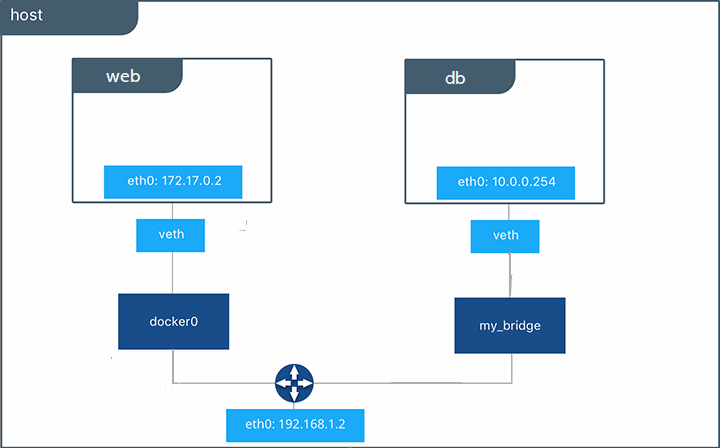
Docker can then connect that container to one or more Docker networks. A network acts as a communication environment for connected containers. Depending on the network driver and configuration, containers can communicate with other containers, the host, or external systems.
A common development setup might look like this:
Frontend container → API container → Database container
The frontend does not need to know the database’s IP address. Instead, the API can communicate with the database using its container or service name. Docker’s internal DNS functionality helps translate those names into appropriate network addresses.
This approach is much more maintainable than hard-coding addresses that may change whenever containers are recreated.
Common Docker Network Types
Docker supports several network drivers, each designed for particular situations. Developers should understand the most commonly encountered options rather than memorizing every advanced networking feature.
Bridge Networks
Bridge networking is one of the most common choices for applications running on a single Docker host. Containers attached to the same user-defined bridge network can communicate with each other.
For example, an application could have:
frontendbackenddatabase
When all three containers share an appropriate network, the backend can reach the database using its service name rather than a manually assigned IP address.
User-defined bridge networks are especially useful because they provide better service discovery and isolation than relying on Docker’s default bridge behavior.
Host Networking
Host networking removes much of the network isolation between the container and the host. The container uses the host’s networking environment directly.
This can be useful in specialized scenarios where network performance or direct host-level access matters. However, it also reduces isolation, so it should not automatically be the first choice for ordinary web applications.
Developers should understand the trade-off between convenience and isolation before selecting host networking.
None Networking
The none network mode provides a container with no normal external network connectivity. It can be useful for workloads that do not need networking or for specialized security and testing scenarios.
Although less common in everyday development, understanding this option helps explain that containers do not have to be network-connected by default.
Overlay Networks
Overlay networks are designed for communication across multiple Docker hosts, particularly in clustered or orchestration environments. Instead of restricting communication to a single machine, overlay networking can connect services across participating hosts.
This becomes more relevant when applications move beyond a simple local Docker setup into distributed deployments.
Docker Network Drivers at a Glance
| Network Type | Typical Use | Main Benefit | Important Consideration |
|---|---|---|---|
| Bridge | Single-host applications | Easy container communication | Limited to the host by default |
| Host | Specialized workloads | Direct host networking | Reduced network isolation |
| None | Isolated containers | Minimal connectivity | No normal network access |
| Overlay | Multi-host environments | Cross-host communication | Requires more infrastructure |
Choosing a network type should depend on the application’s architecture rather than personal preference. A small development project may only require a user-defined bridge network, while distributed services may require more sophisticated networking.
Container-to-Container Communication
One of the most important Docker networking concepts is container-to-container communication.
Suppose an API application needs to connect to a database. A developer might initially think the API should connect to a specific IP address. That approach can become fragile because container addresses may change when containers are restarted or recreated.
Instead, applications should generally communicate using stable service or container names within the appropriate Docker network.
For example, conceptually:
API → database:5432
Here, database can represent the database service name, while 5432 represents the database port inside the Docker network.
This distinction is important because the port exposed to the host does not necessarily need to be the same port used for internal container communication.
Understanding Port Mapping
Port mapping connects a container port to a port on the host machine.
Consider a web application listening on port 8080 inside a container. A developer might map it to port 3000 on the host. Users can then access the application through the host’s port while the application continues listening on 8080 internally.
The basic concept is:
Host Port → Container Port
For example:
3000 → 8080
Port mapping is primarily about making container services reachable from outside the container’s network environment. It is not always necessary for communication between containers on the same Docker network.
This is an important distinction for beginners. If an API and database share a Docker network, the API generally does not need to access the database through the host’s published port.
Docker DNS and Service Discovery
Service discovery is another major reason Docker networking is convenient. Containers connected to the same user-defined network can typically locate one another by name.
This removes the need for applications to constantly track changing container IP addresses.
For a multi-service project, developers might have names such as:
webapipostgresredisworker
The API can then communicate with postgres, while the worker can communicate with redis, assuming those services are connected to the appropriate network.
pblinuxtech-focused learning should emphasize this concept because name-based communication is one of the easiest ways to make containerized applications more portable and maintainable.
Creating a Practical Application Network
A useful development pattern is to create a dedicated network for each application stack. Instead of attaching every container on a machine to one shared network, developers can isolate related services.
For example, an e-commerce application might contain:
Public-facing services
- Web frontend
- Reverse proxy
Internal services
- API
- Database
- Cache
- Background worker
The frontend may need to communicate with the API, while the database should ideally remain inaccessible to unrelated containers.
Creating separate networks can help establish these boundaries. A service can also participate in multiple networks when it legitimately needs to connect two application layers.
This produces a more deliberate architecture instead of allowing unrestricted communication between every container.
Network Security Best Practices
Networking is closely connected to container security. A network configuration that works technically may still expose services unnecessarily.
Developers should follow several practical principles.
Expose Only Required Ports
Avoid publishing every container port to the host. A database that only needs to communicate with an API does not necessarily need to be directly accessible from the host network.
Separate Application Layers
Consider placing databases and internal services on private application networks while exposing only the components that need external access.
Avoid Hard-Coded Container IPs
Container addresses can change. Use service names and application-level configuration instead.
Review Network Membership
Periodically check which containers are connected to each network. Removing unnecessary connections reduces the potential communication paths within the application.
Protect Sensitive Services
Databases, administrative dashboards, internal queues, and similar services should not automatically be exposed simply because they run inside containers.
Security should be considered when designing the network rather than added after deployment.
Docker Networking in Multi-Container Projects
Tools that define multiple services make Docker networking significantly easier to manage. A configuration can describe application services, networks, dependencies, ports, and environment settings in one place.
This approach is particularly useful for development teams because everyone can reproduce a similar environment.
A project might define:
- A frontend service
- An API service
- A database service
- A cache service
- A dedicated application network
When the environment starts, Docker can establish the declared networks and connect services accordingly. Developers can then focus on application behavior instead of manually creating networking configurations every time.
This is one reason containerized development works well for teams. Infrastructure details become part of the project rather than depending entirely on an individual’s workstation.
Troubleshooting Docker Network Problems
Networking problems can initially appear confusing because several layers may be involved. A service may be running correctly while still being unreachable because of an incorrect network connection, port mapping, DNS name, or application binding configuration.
When troubleshooting, check the problem systematically.
Check Whether the Containers Are Running
A stopped container obviously cannot provide a network service. Start by confirming that the expected services are active.
Inspect Network Membership
Determine whether both communicating containers are connected to the same network. If they are isolated from one another, name-based communication will not work.
Verify Service Names
Check that the hostname used by the application matches the actual container or service name available on the network.
Check Internal Ports
Make sure the application is listening on the expected container port. Remember that the internal service port and published host port can be different.
Check Application Binding
An application listening only on localhost inside its container may not accept connections from other containers. Many server applications need to listen on an appropriate interface such as 0.0.0.0.
A methodical troubleshooting process is usually faster than randomly changing ports and network settings.
Useful Docker Networking Commands
Developers should become comfortable with a small collection of networking commands. They provide enough visibility for many common tasks without requiring advanced tooling.
Useful operations include:
- Listing available Docker networks
- Inspecting a specific network
- Creating a user-defined network
- Connecting a container to a network
- Disconnecting a container from a network
- Removing an unused network
- Inspecting container network settings
Network inspection is especially valuable when troubleshooting. It can reveal connected containers, assigned addresses, configuration details, and other information that may explain why communication is failing.
Instead of guessing, inspect the actual Docker configuration first and then make targeted changes.
Common Mistakes Developers Should Avoid
Beginners often encounter similar networking mistakes when building their first multi-container projects.
One frequent error is using localhost when connecting from one container to another. Inside a container, localhost refers to that same container, not automatically to another service or the Docker host.
Another mistake is assuming that publishing a port is required for every container-to-container connection. Services sharing an appropriate Docker network can often communicate directly through their internal ports.
Developers may also expose databases unnecessarily, hard-code container IP addresses, or attach unrelated applications to the same network.
Avoiding these mistakes makes configurations simpler and improves security at the same time.
Building Better Docker Networking Habits
A strong Docker networking strategy begins with understanding which services actually need to communicate. Rather than creating broad connectivity first and restricting it later, design the network around application relationships.
For every service, ask:
- Who needs to access this service?
- Does it need internet access?
- Does the host need direct access?
- Which internal port does it provide?
- Should its port be published?
- Which Docker network should it join?
These questions encourage developers to think about networking as part of application architecture.
pblinuxtech-style technical learning can become much more practical when Docker concepts are connected to real development scenarios instead of being treated as isolated commands.
Conclusion
Docker networking is one of the fundamental skills developers need when building modern containerized applications. It explains how isolated containers communicate, how services discover each other, how ports become accessible, and how application components can be separated into controlled network environments. The most important concepts to master are bridge networks, host networking, overlay networking, service discovery, DNS, port mapping, network isolation, and troubleshooting. Developers should also understand that internal container communication and external host access are two different networking concerns.
With these fundamentals, multi-container projects become easier to design, debug, secure, and maintain. Whether you are creating a small local development environment or preparing for a distributed deployment, strong networking knowledge provides a foundation for more reliable container architecture. For developers building their technical skills with pblinuxtech concepts in mind, Docker networking is a practical area worth mastering because it connects container theory directly to real-world application deployment.